Product labeling tools for Google Shopping have become standard practice. The promise is straightforward: classify your catalog into performance tiers, route each tier into the right campaign, and watch Smart Bidding perform better with cleaner signals.
In theory, this makes sense. In practice, I see more accounts harmed by their labeling setup than helped by it. Not because the concept is wrong — it isn't — but because the implementation almost always rests on assumptions that don't hold up when you examine them.
This piece covers how labeling actually works, where the common setups go wrong, and what a well-designed structure looks like in real accounts.
What Smart Bidding Actually Needs From You
Before talking about campaign structure, it's worth being precise about what you're trying to give Smart Bidding when you create separate campaigns for different product tiers.
Smart Bidding optimises at the auction level. For each query, on each device, at each time of day, for each user profile — it calculates an expected conversion probability and sets a bid accordingly. To do this reliably, it needs volume. The commonly cited minimum is 30–50 conversions per campaign per month before the algorithm leaves the learning phase.
This is where most multi-campaign structures quietly collapse. Take an account generating 80 conversions per month. That's a healthy signal for a single campaign. Distribute those conversions across four or five campaigns and you're looking at 16–20 per campaign — below the learning threshold in every single one.
The accounts that suffer most from this aren't the largest ones — they have enough volume that the split still works. It's the mid-size accounts spending $5,000–$20,000 per month where the math just doesn't support the structure they've been told to build.
The question to ask before creating any campaign split isn't "does it make sense to separate these products?" It's "does separating these products give Smart Bidding a more useful signal than it has now, or does it just reduce the volume available to each campaign?"
The Problem With Conversion Thresholds
Every labeling tool — whether it's a script, a SaaS product, or a manual process — relies on a threshold to classify products. The threshold answers the question: how much data do I need before I'll say a product is performing well or poorly?
This sounds simple. It isn't, and the way most people set thresholds creates real problems.
Consider a footwear retailer with 400 SKUs. Average product gets 30–40 clicks per month. If you set a threshold requiring 50+ clicks before classification, you're covering maybe 15% of the catalog. That's not meaningfully useful. So you lower it. Maybe 20 clicks. Now you're covering more products — but a product with 20 clicks has a 95% confidence interval on its conversion rate that spans roughly 0% to 25%. The label you're assigning is based on an observation window that's too narrow to tell you anything reliable.
The issue compounds with product variants. Most catalogs contain products that come in multiple configurations — size, colour, capacity, finish. Each variant is typically stored as a separate SKU in Merchant Center and attributed separately in Google Ads. A product might genuinely be a strong seller across its full range, but when you look at individual variants in isolation, you see a patchwork: some variants with several conversions, most with very few, some with none at all.
Labeling at the variant level creates a false picture. The product itself may be a consistent performer. But the data — spread thinly across a dozen configurations — looks erratic. The fix is to aggregate to the product group level (Merchant Center's item_group_id) before making any classification decision. The combined performance of all variants of a product is a far more reliable signal than the performance of any individual variant.
A useful rule of thumb: before classifying any product as a bestseller or flagging it as underperforming, it should have at least 5 conversions at the product group level within the lookback window. Below that, you're assigning labels based on events that could plausibly be random variation rather than genuine performance signal.
What Your Labels Are Actually Telling Google
Once you have labels applied and campaigns structured, it's worth thinking carefully about what each campaign configuration is communicating to Smart Bidding — because it's not always what you intend.
A campaign structure for Google Shopping uses campaign priority to resolve conflicts when a product could be served from multiple campaigns. High priority campaigns get first right of refusal on matching queries. This is a powerful mechanism for ensuring your strongest products get preference in competitive auctions.
But campaign priority only controls which campaign serves the impression. The ROAS target controls how aggressively Smart Bidding bids in that auction. And this is where a lot of structures introduce an unintended outcome.
The bestseller campaign ROAS target
The most common configuration: a high-priority bestseller campaign with an elevated ROAS target. The rationale is that top products should drive a higher return, so we set the bar higher.
The problem is that Smart Bidding is already doing this internally. It already recognises which products convert well and bids accordingly. When you set the ROAS target at or above what these products are currently achieving, you're not raising the standard — you're installing a ceiling. The algorithm can't push spend onto these products without risking a target breach, so it pulls back.
A higher ROAS target on your bestseller campaign does not mean better performance from your bestsellers. It means Smart Bidding has less room to serve them. If these products are hitting 700% ROAS and your target is 700%, Smart Bidding is operating at its limit. Set the target to 500% and you give it permission to chase volume — more impressions, more positions, more audiences — while still well above your actual minimum threshold.
The goal of isolating your best products in a high-priority campaign is to give them preferential access to impressions when they're competing against other products in your own catalog. The ROAS target should be set to facilitate scale, not to extract maximum efficiency from every click.
What restricted campaigns actually communicate
The flip side of the bestseller campaign is the restricted campaigns — unprofitable products, low performers, products getting minimal traffic. The standard recommendation is to put these in their own campaign with a lower ROAS target to "limit their spend" or "give them room to prove themselves."
A lower ROAS target doesn't limit spend. It increases bids. You're telling Smart Bidding you're willing to accept a worse return on these products — which means it bids higher on them in auctions. For products that are genuinely weak performers, this is backwards: you're allocating more competitive bids to products that convert poorly, at the expense of budget that could go to your proven winners.
Smart Bidding is already doing the work of deprioritising weak products when given a unified campaign with enough data. The most effective restriction on underperforming products is usually not a separate campaign — it's ensuring the main campaign has a full dataset and a clear target to work from.
When Separate Campaigns Do Make Sense
None of this is an argument against campaign structure. It's an argument for intentional campaign structure — where each split is justified by a specific operational need, not by a template someone else built.
Valid reasons to add a campaign
- An entire product category is getting near-zero impressions despite adequate overall budget — this is a coverage problem, not an optimisation problem
- A product line has a meaningfully different margin profile, requiring a different ROAS target that would distort the main campaign if applied account-wide
- A large batch of new products (50+ SKUs) needs dedicated budget for ramp-up before the products have conversion history
- You have strong evidence — from impression share data, not just ROAS — that a subcategory is being systematically under-served
Not enough reason to add a campaign
- Products have a different performance label but similar traffic patterns — Smart Bidding already handles this internally
- Individual SKUs have zero impressions but the broader category is active — diagnose the feed or policy issue first
- You want to "give new products a chance" — new products generally benefit more from the historical signals of an established campaign than from isolation
- The template you're following includes five campaigns — templates are starting points, not prescriptions
Every campaign you create beyond the first is a deliberate fragmentation of your conversion data. The question is always: does the operational benefit of this split exceed the cost of the reduced signal available to each campaign? If you can't articulate a measurable outcome to check after 4–6 weeks, the split probably shouldn't exist.
A Practical Starting Point
For most ecommerce accounts — particularly those spending under $30,000 per month on Shopping — the structure that works is simpler than advertised:
| Campaign | Priority | Products | ROAS Target |
|---|---|---|---|
| Best Sellers | High | Top performers per category (aggregated at product group level, category-capped to avoid single-category dominance) | Set 20–30% below current average ROAS — creates headroom to scale |
| Everything Else | Medium | All remaining products, including newer SKUs, mid-tier performers, and products still building conversion history | Your standard account target |
Two campaigns. The conversion data stays concentrated enough for Smart Bidding to learn. The high-priority campaign ensures your strongest products win competitive impressions. And the ROAS target on that campaign is set to grow volume, not constrain it.
From this foundation, you add structure only when a specific data point tells you to. Not because a tool flagged a product as a zombie. Not because a template has a slot for it. But because you've identified a category with zero coverage, or a product line that genuinely needs a different target to operate correctly.
Keeping Labels Current
One thing the structure can't do on its own is stay accurate over time. A product labeled as a top performer in Q3 may look very different in Q1 — price changes, competitor inventory shifts, seasonal demand patterns all affect conversion rates in ways that don't show up immediately in a 90-day lookback.
A few things worth building into your labeling process:
- Weekly refresh with an appropriate lookback window. For stable catalogs, 60–90 days gives you a reliable signal. For seasonal or fashion-oriented catalogs, 30 days is often more accurate — even if it introduces slightly more variance.
- Trend awareness alongside absolute performance. A product sitting at 4× ROAS that was at 6× three months ago is a different proposition to one that's been stable at 4×. Comparing the current period against the prior equivalent period surfaces products worth watching before they become problems.
- Feed health separation. Products with zero impressions due to a Merchant Center disapproval need a different response than products with zero impressions because they're simply not competitive in their category. Treating them the same produces the wrong fix for at least half of them.
Labels are inputs to a system. The system — the campaign structure, the ROAS targets, the review cadence — is where the performance actually comes from. Get the inputs right, but don't mistake having labels for having a strategy.
What This Looks Like in Practice
One client came to us with a Shopping campaign structured around broad product category splits — multiple campaigns with overlapping product sets and inconsistent ROAS targets. The catalog had strong underlying performance, but the signal was fragmented across too many campaigns, all operating below the conversion threshold Smart Bidding needs to make reliable decisions.
We consolidated the structure, applied product-group-level labeling with a 5-conversion minimum threshold, and reset the ROAS targets to give Smart Bidding room to scale rather than constrain it. The results across the comparable period after the change:
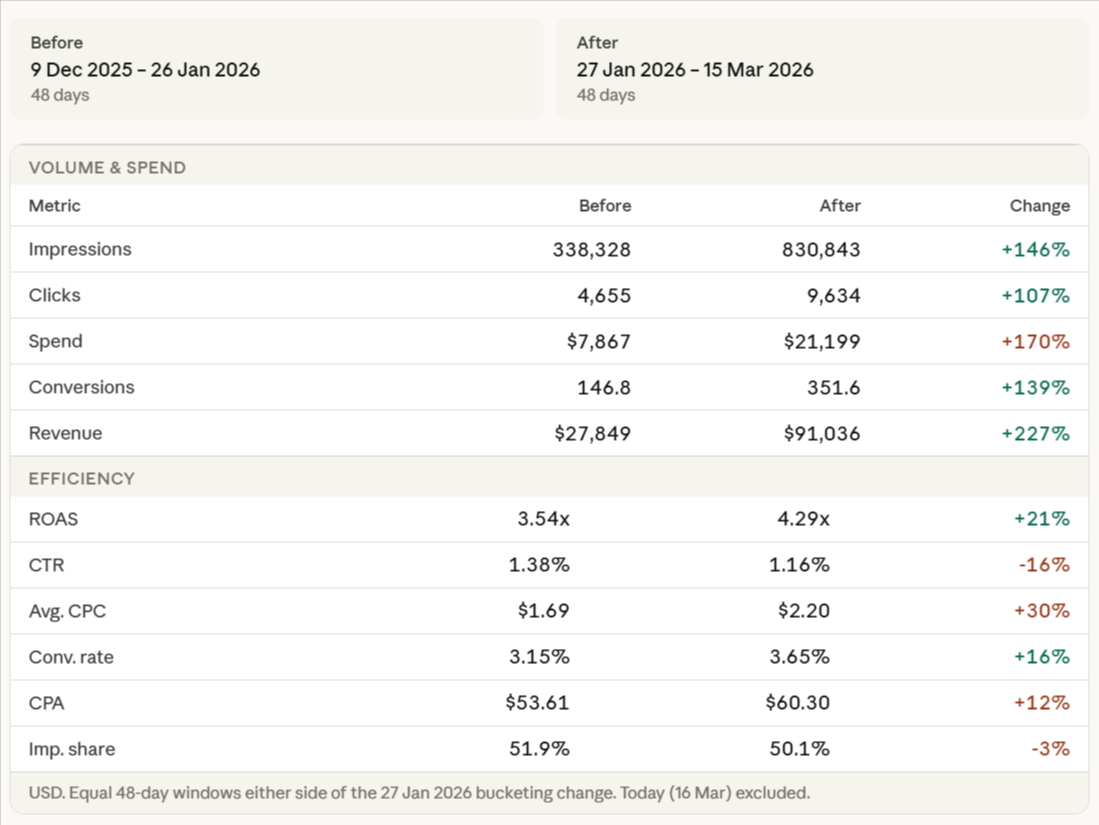
A few things worth unpacking from these numbers:
AOV is the standout metric. Average order value increased 36% — from $189 to $259. This is the main driver of the ROAS improvement, not just volume. The bucketing change surfaced higher-value products more effectively, giving Smart Bidding cleaner signals to target the auctions most likely to result in higher-value purchases. This is exactly what a well-configured label structure should do.
IS lost (budget) is a warning sign. Budget-constrained impression share jumped from 22% to 34% after the change. The campaign is now clearly being held back by budget. This is actually a positive signal — it means the algorithm has identified more quality auctions than the current budget allows it to enter. If budget is increased here, there's meaningful impression share available to capture immediately.
Context: Budget constraints during this period were set by the client. The campaign performed well within those constraints — the IS lost (budget) figure tells you what performance looks like when the floor is removed, not that something is wrong with the structure.
IS lost (rank) improved significantly. Rank-based impression share loss dropped from 26% to 16%, meaning the bids and quality signals are stronger post-restructure. The campaign is winning more of the auctions it enters. The combination — better rank signals, constrained by budget rather than by quality — is the result you're looking for when consolidating and reconfiguring a Shopping structure. The limiting factor is now external (budget), not internal (bid quality or signal fragmentation).
Want to see the full breakdown? Read the case study →